
SchoolMint Login Help
SchoolMint is the system we use to manage applications, enrollment, and re-enrollment. Uplift Education is converting to an updated SchoolMint version as of October 2026. The new platform will require users to either reset their password or create a new account.
STATUS #1
STATUS #2
- You have a scholar currently enrolled in an Uplift Education school.
- You don’t have an enrolled scholar but have completed the full registration process within the past 3 years.
Use your same SchoolMint user name and reset your password.
- You have not applied to Uplift Education before.
- You have applied before but did not get offered a spot or did not complete the full registration process within the past three years.
Create a new account in SchoolMint.
Important Dates
October 5, 2026
Applications open for NEW Uplift Scholars (including non-enrolled siblings of current Uplift scholars)
January 4, 2027
Reenrollment opens for existing Uplift families.
February 1, 2027
Lottery selection and offers sent to new students for K-12.
April 1, 2027
Offers sent to new Pre-K students.
How to Reset Your Password (Status #1)
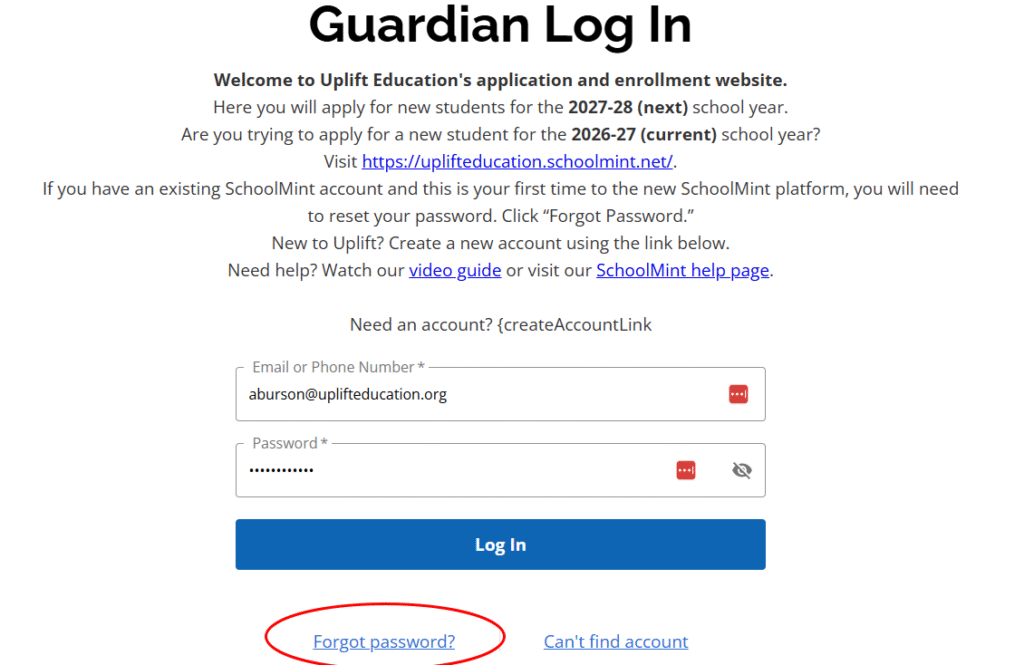
- Go to uplifteducation.schoolmint.com
- Enter your old SchoolMint login/user name – either your email or your phone #.
- Click Forgot Password?
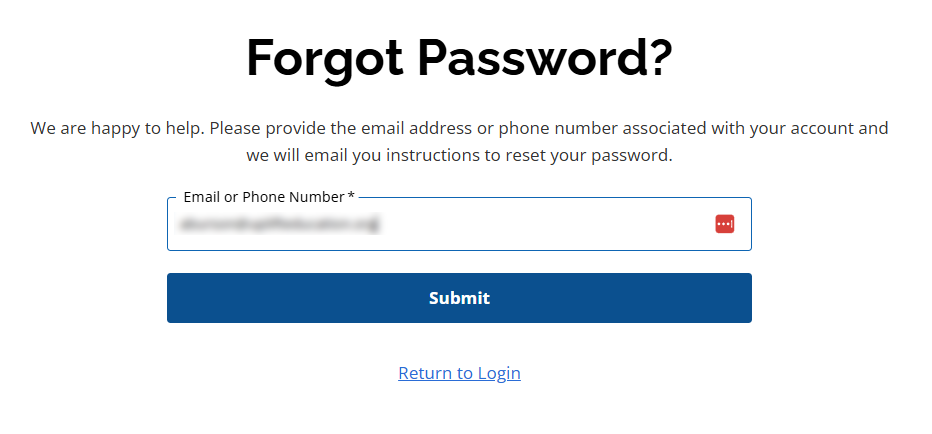
- Enter the email or phone# associated with your account in the Forgot Password screen and click Submit.
- You will receive an email or a text with a link to reset your password.
Click the link, then on the next screen, enter the email or phone number associated with your SchoolMint account. Set and confirm your new password, which should meet all of the password requirements indicated.
NOTE: if you clicked Forgot Password, but didn’t receive an email or text to reset your password, you might not have an active Uplift account. Please create a new account.
Can’t remember username?
Your username is generally your email or phone number. If you didn’t receive an email to reset your password and can’t remember your login information:
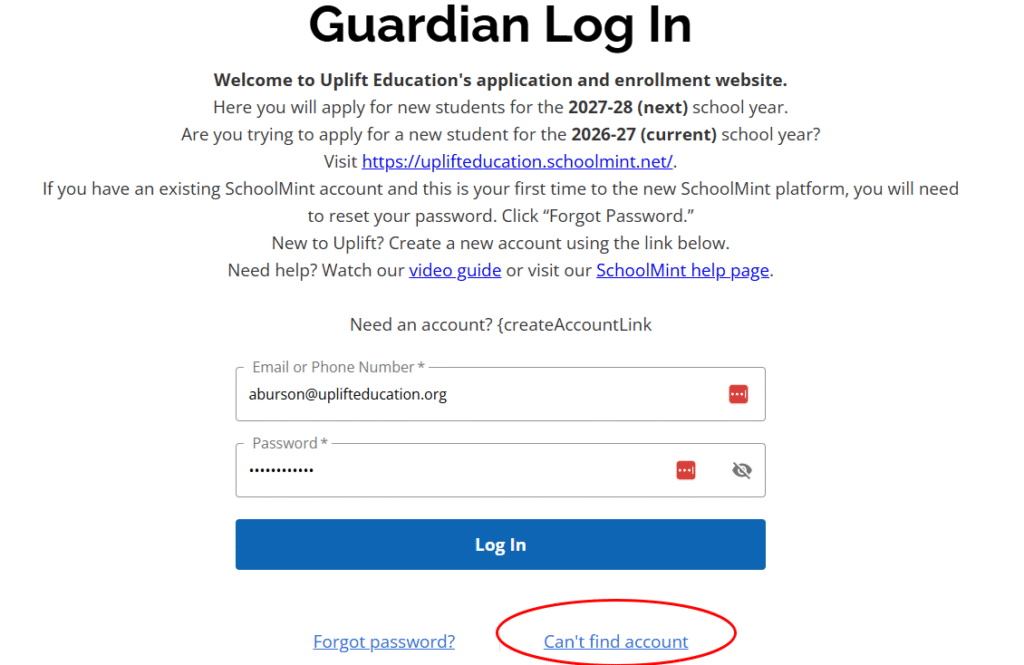
- Go to uplifteducation.schoolmint.com
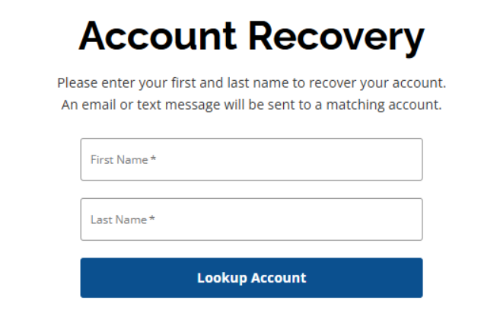
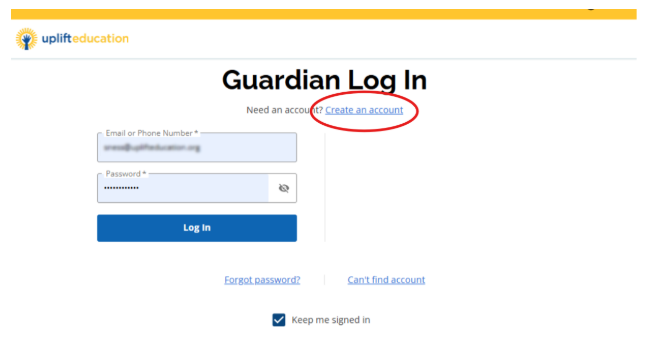
- On the Log In screen, click Can’t find account and you will be directed to an Account Recovery page to look up your account by your first name and last name.
- Fill in your first and last name (name of parent/guardian) and click Lookup Account.
- If an account exists, you will receive an email with your username.
NOTE: if you do not receive an email, you likely do not have an active SchoolMint account. Please create an account.
Create a New Account (Status #2)
- Go to uplifteducation.schoolmint.com
- Click Create an account at the top of the login screen.
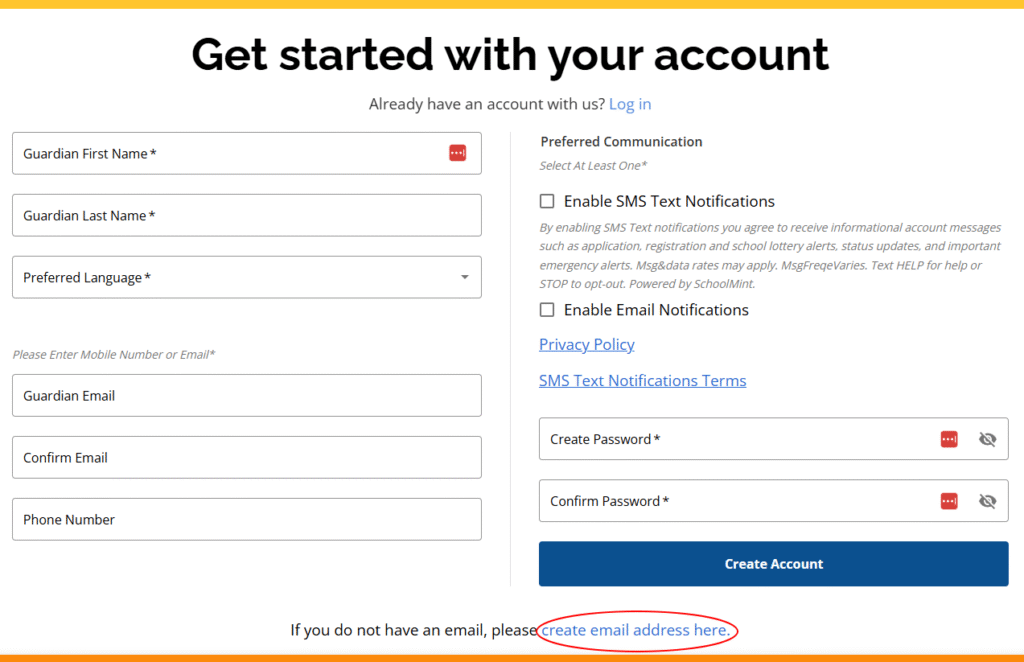
- Fill in the appropriate information, set your password, and click Create Account.
NOTE: Most communication from Schoolmint/Uplift Education occurs via email, so please do not uncheck email notifications. Also, make sure you use an email address for your account that you have access to and can regularly check. If you do not have an email account, there is a link at the bottom of the “Create an Account” screen that will help you set up a free Google Gmail account.
Need Help?
If you have activated your new SchoolMint account by resetting your password, and after logging in you do not see your child or children listed on your dashboard, please email upliftenrolls@uplifteducation.org for assistance. Please include your name, your email, your child or children’s names, grade, and school.
Frequently Asked Questions
If you have a child currently enrolled in Uplift Education, your login (email or phone number) will continue to work, but you will need to reset your password. Click here for password reset instructions. Families who completed the full registration process in the past 3 years, but are not currently enrolled could still have an active SchoolMint account. Follow the instructions to reset your password. If you have never enrolled in Uplift Education, you will need to create a new account. Click for instructions for creating a new account.
You should reset your password prior to January when reenrollent opens. If you want to add a sibling application or apply to a different Uplift school for the 2027-2028 school you can reset your password after October 5, 2026 and complete your application.
If you have a current SchoolMint account (See Status #1 at top of this page) in the old platform go to uplifteducation.schoolmint.com. On the login screen, click the Can’t Find Account link and you will be taken to the Account Recovery screen for further action. If you are unsuccessful at recovering your login, please email upliftenrolls@uplifteducation.org
Unless you have a current Uplift scholar, or went through the full registration process in the last three years, you will likely need to create a new account.
Yes! You can use the same email you have used in the past for creating a new account.
While you can also use a phone number for your login, we strongly recommend that you have an active email account that you can access and regularly check. Most communication from Uplift Education is sent via email. You can create a Google account with a free email that can be easily checked from your phone. Visit the Google support page for more information. We do not recommend creating an account with a phone number.
Yes, you should use the same Schoolmint account to apply for more than one child.
If you have an additional parent/guardian who needs access to your child's SchoolMint account, or you need to remove a parent/guardian from your child's SchoolMint account, please email upliftenrolls@uplifteducation.org.
No, applications for new students must be submitted every year.
No, but you must reset it before you can access your NEW SchoolMint account to apply for a new students, apply for a transfer, or reenroll.
No. However, SchoolMint website is mobile friendly.
Email us at upliftenrolls@uplifteducation.org and our team can help you regain access to your account.